「I\u2019ve traded XAU for two years and used to guess direction on feel at night. Now I check the AI briefing\u2019s bull/bear resonance first, then compare with the pattern signals \u2014 at least I know if today leans bullish or range-bound, which feels steadier. Updates are frequent and it held up fine on NFP night.」
Pattern Studio
Financial Trading Tools
& AI Quant Analysis
Professional iOS apps built for gold, forex, bitcoin and oil. Pattern recognition, signal backtesting and 24/7 intelligence \u2014 turning complex markets into actionable information.
6Pro Apps
AIPowered Engine
24/7Market Coverage
Our Products
Tap an app to see highlights and interface previews
Flagship
Gold Pattern Pro
AI Gold Futures Market Analysis · V1.5.3
Languages: English, Chinese
App Store description
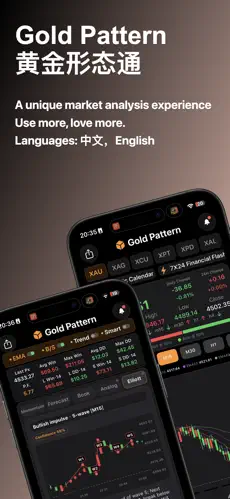
Follow real-time gold, London bullion and XAUUSD, with silver and other metal charts in one place. Review candlesticks across multiple timeframes and add technical indicators for structured study.
Explore chart patterns with historical occurrence statistics. VP, VCP, ODDS and ECHO provide additional ways to compare price structure and past behaviour; they are research tools, not forecasts.
Brief updates, an economic calendar, home-screen widgets and optional alerts help you keep track of market context. Data availability and timing may vary.
For learning and research only. Nothing in the app is investment advice, and historical statistics do not predict or guarantee future results.
Explore chart patterns with historical occurrence statistics. VP, VCP, ODDS and ECHO provide additional ways to compare price structure and past behaviour; they are research tools, not forecasts.
Brief updates, an economic calendar, home-screen widgets and optional alerts help you keep track of market context. Data availability and timing may vary.
For learning and research only. Nothing in the app is investment advice, and historical statistics do not predict or guarantee future results.
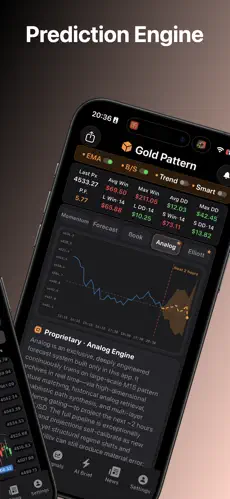
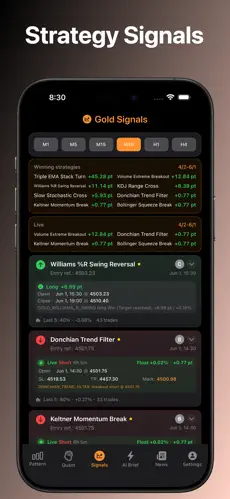
- AI Signal Engine Auto-scans multi-timeframe gold (XAUUSD) quotes, fusing MACD, RSI and other indicators into long/short signals, and shows historical win rate, average return and the last 5 results for easy strategy backtesting.
- 18 Pattern Library Built-in classic candlestick patterns (hammer, engulfing, shooting star, etc.). Charts auto-annotate trigger points and tally each pattern\u2019s frequency and bull/bear win rate across timeframes.
- 24h AI Briefing Round-the-clock interpretation of short-term gold trends and key support/resistance, with a bull/bear resonance percentage that yields a "bullish / bearish / range" verdict, plus timely notes at key volatility points.
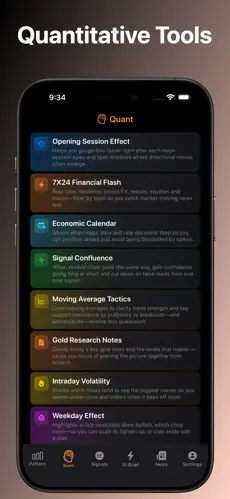
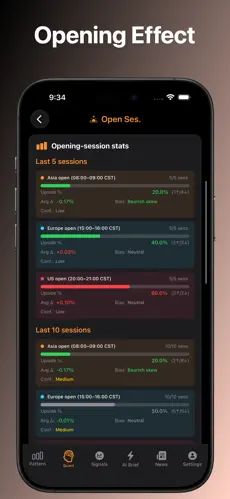
- Quant Microscope Breaks down session-open effects (Asia/Europe/US), day-of-week effects and intraday volatility peaks; 8-dimensional quant tools help uncover repeatable market rhythm and trading windows.
Forex
FX Pattern Pro
AI-Powered Forex Analysis Tool · V3.2
Languages: English, Chinese
App Store description
【FX Pattern · Your Professional Forex Analysis Suite】
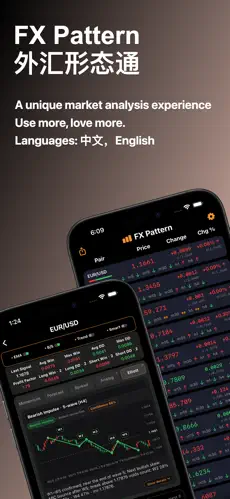
FX Pattern is a professional-grade analysis tool designed for Forex traders, investors, and technical analysts. Whether you are a beginner or a seasoned pro trading EUR/USD, GBP/USD, USD/JPY, Gold (XAU/USD), or Crude Oil, FX Pattern provides a one-stop workstation for live quotes, K-line patterns, and data-driven trend forecasting.
【Smart Candlestick Recognition】
Our core engine automatically identifies dozens of classic patterns: Hammer, Engulfing, Harami, Morning Star, Evening Star, and Three White Soldiers. Combined with multi-timeframe signals and RSI momentum, we help you decode market structures faster than standard quote apps.
【Intelligence Center: 5-D Analysis】
• Momentum Trend: Real-time Support/Resistance levels, RSI divergence alerts, and trend strength indicators on a single screen.
• Trend Forecast: Algorithm-based Bullish/Bearish signals with probability strength across multiple timeframes.
• Spread Sentinel: Real-time Bid/Ask and spread monitoring. Avoid high-friction periods and optimize your entry costs.
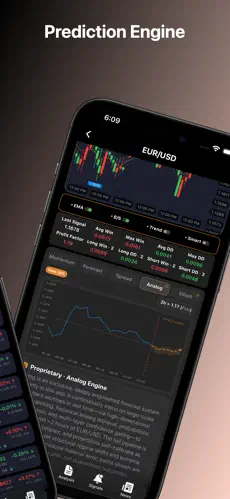
• Analog Prediction: Exclusive M15 historical matching engine. It analyzes historical price paths to project potential movements for the next 2 hours.
• Elliott Wave: Automated wave identification providing clear structural views of the current market cycle.
【Real-Time Quotes & Multi-Timeframe Signals】
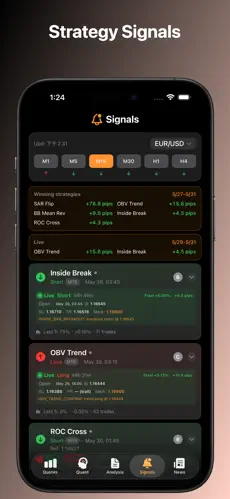
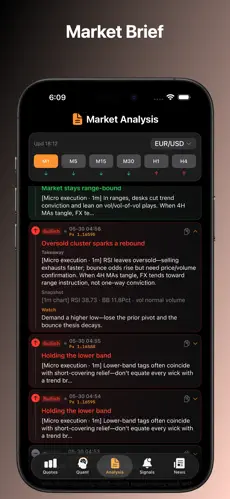
Monitor major pairs with live price updates and Buy/Sell signals across six timeframes (M1, M5, M15, M30, H1, H4). Our professional charts support zooming, MA overlays, and historical trade marking, allowing you to see "Direction" in the list and "Structure" in the details.
【Quantitative Toolbox】
• Trading Hours: Statistical win/loss probability across Asian, European, and US sessions.
• 7x24 News & Calendar: Instant updates on NFP, CPI, and central bank decisions with local reminders.
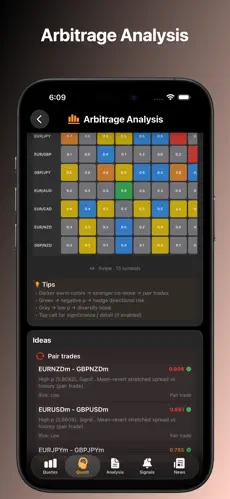
• Signal Resonance: Score-based ranking to find the strongest or weakest currency pairs.
• Intraday Volatility: Heatmaps showing peak volatility hours for better stop-loss management.
• MA Backtest: Validate moving average strategies with historical performance data.
• Correlation Matrix: Manage risk with correlation data for 13 major assets.
【Global Information Hub】
Forex markets are driven by macro events. FX Pattern keeps you informed with 24/7 scrolling news (available in voice-reading mode) and a comprehensive economic calendar. Filter by region or asset class to focus on what moves your portfolio.
【Why FX Pattern?】
• Local Recognition: Fast pattern detection with cloud-synced data.
• Deep Analytics: From momentum to Elliott Waves, get a complete view.
• Data-Driven: 8 Quant tools to validate your trading intuition.
• Clean UI: Pro-dark mode designed for long-hour market monitoring.
【Important Disclaimer】
All analysis, pattern recognition, and quantitative data provided are for educational and technical research purposes only. They do not constitute investment or financial advice. Forex and CFD trading involve high risk and may lead to loss of principal. Please trade responsibly.
Download FX Pattern now for smarter market analysis.
Membership Subscription Plans: Monthly, quarterly, and annual subscriptions with a 7-day free trial. This service is an auto-renewing subscription; it will automatically renew and charge after the free trial ends. Renewal will be charged to your Apple ID account within 24 hours prior to the end of the current subscription period. To cancel renewal, please go to iPhone/iPad "Settings" > "Apple ID" > "Media & Purchases" > "View Account" > "Subscriptions" to manage and turn off auto-renewal at least 24 hours before the end of the current period. Privacy Policy: https://help.meihuagold.com/fx/en/privacy.html . Terms of Service: https://help.meihuagold.com/fx/en/premium.html
FX Pattern is a professional-grade analysis tool designed for Forex traders, investors, and technical analysts. Whether you are a beginner or a seasoned pro trading EUR/USD, GBP/USD, USD/JPY, Gold (XAU/USD), or Crude Oil, FX Pattern provides a one-stop workstation for live quotes, K-line patterns, and data-driven trend forecasting.
【Smart Candlestick Recognition】
Our core engine automatically identifies dozens of classic patterns: Hammer, Engulfing, Harami, Morning Star, Evening Star, and Three White Soldiers. Combined with multi-timeframe signals and RSI momentum, we help you decode market structures faster than standard quote apps.
【Intelligence Center: 5-D Analysis】
• Momentum Trend: Real-time Support/Resistance levels, RSI divergence alerts, and trend strength indicators on a single screen.
• Trend Forecast: Algorithm-based Bullish/Bearish signals with probability strength across multiple timeframes.
• Spread Sentinel: Real-time Bid/Ask and spread monitoring. Avoid high-friction periods and optimize your entry costs.
• Analog Prediction: Exclusive M15 historical matching engine. It analyzes historical price paths to project potential movements for the next 2 hours.
• Elliott Wave: Automated wave identification providing clear structural views of the current market cycle.
【Real-Time Quotes & Multi-Timeframe Signals】
Monitor major pairs with live price updates and Buy/Sell signals across six timeframes (M1, M5, M15, M30, H1, H4). Our professional charts support zooming, MA overlays, and historical trade marking, allowing you to see "Direction" in the list and "Structure" in the details.
【Quantitative Toolbox】
• Trading Hours: Statistical win/loss probability across Asian, European, and US sessions.
• 7x24 News & Calendar: Instant updates on NFP, CPI, and central bank decisions with local reminders.
• Signal Resonance: Score-based ranking to find the strongest or weakest currency pairs.
• Intraday Volatility: Heatmaps showing peak volatility hours for better stop-loss management.
• MA Backtest: Validate moving average strategies with historical performance data.
• Correlation Matrix: Manage risk with correlation data for 13 major assets.
【Global Information Hub】
Forex markets are driven by macro events. FX Pattern keeps you informed with 24/7 scrolling news (available in voice-reading mode) and a comprehensive economic calendar. Filter by region or asset class to focus on what moves your portfolio.
【Why FX Pattern?】
• Local Recognition: Fast pattern detection with cloud-synced data.
• Deep Analytics: From momentum to Elliott Waves, get a complete view.
• Data-Driven: 8 Quant tools to validate your trading intuition.
• Clean UI: Pro-dark mode designed for long-hour market monitoring.
【Important Disclaimer】
All analysis, pattern recognition, and quantitative data provided are for educational and technical research purposes only. They do not constitute investment or financial advice. Forex and CFD trading involve high risk and may lead to loss of principal. Please trade responsibly.
Download FX Pattern now for smarter market analysis.
Membership Subscription Plans: Monthly, quarterly, and annual subscriptions with a 7-day free trial. This service is an auto-renewing subscription; it will automatically renew and charge after the free trial ends. Renewal will be charged to your Apple ID account within 24 hours prior to the end of the current subscription period. To cancel renewal, please go to iPhone/iPad "Settings" > "Apple ID" > "Media & Purchases" > "View Account" > "Subscriptions" to manage and turn off auto-renewal at least 24 hours before the end of the current period. Privacy Policy: https://help.meihuagold.com/fx/en/privacy.html . Terms of Service: https://help.meihuagold.com/fx/en/premium.html
- 13 Major Pairs Covers EUR/USD, GBP/USD, USD/JPY and other popular pairs, putting multi-pair dynamics on one screen and saving the cost of juggling multiple apps.
- Pattern + MACD AI auto-detects 18 classic candlestick patterns and captures MACD golden/death crosses, with historical win rate and return stats, so signals stay transparent and verifiable.
- Backtest Toolbox 9 quant tools including session analysis, strategy backtesting and sentiment monitoring \u2014 validate ideas with data instead of blindly chasing entries.
- Smart Buy/Sell Tips Generates buy/sell references and risk alerts based on multi-indicator resonance, helping you make better-grounded decisions near key price levels.
Bitcoin
Bitcoin Pattern Pro
BTC Bitcoin AI Trading Analysis · V1.3.2
Languages: English, Chinese
App Store description
[BitPattern · see the tape on one screen]
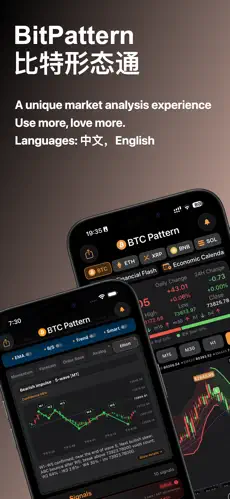
BitPattern is a market-analysis app for Bitcoin and crypto traders: candlestick patterns, multi-timeframe indicators, rule-based backtests, AI reads, 24/7 headlines, alerts and a Home Screen widget in one place. Every conclusion shows its basis and record so you can check it yourself. Study-only — for reviewing the chart, not live orders, copy trading or investment advice.
[TURN stochastic turns]
TURN computes a smoothed stochastic %K/%D on two timeframes you pick and gives a dual-timeframe resonance verdict. Turns in overbought or oversold zones are flagged, with a dedicated chart and history. Alerts reopen the chart; they are not calls or auto-orders.
[SYNM grid]
SYNM folds MACD, MA, BOLL, Donchian, SAR, OBV, ROC, KDJ, RSI and CCI into one grid aligned with the candles: each column is one bar, each cell that indicator’s direction. A one-color column means most agree; mixed grey means they disagree.
[21 candlestick patterns]
21 classic patterns (morning/evening star, engulfing, hammer, doji and more) with counts and historical hit-rate by holding period. Study stats, not a future promise.
[Charts · six timeframes]
M1–H4. EMA, AI B/S, trend, smart, volume profile. Last price, 24-hour change, high/low. Cache for weak networks. Red-up or green-up colors.
[Insight Center]
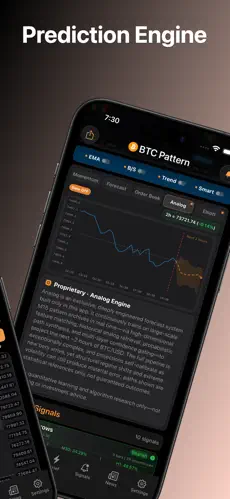
Order-book cost, VCP breakout, momentum divergence and Elliott waves for structure checks. Analog sketches a ~2-hour path from M15 analogues and can miss in extremes. Study, not live orders.
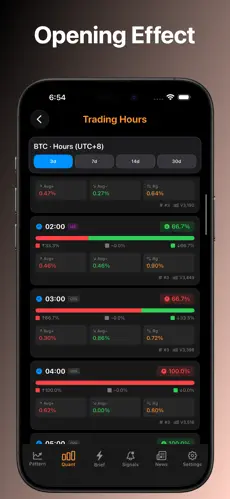
[Nine tools]
Hourly bias, tape read, 13 MA playbooks, six-TF RSI/MACD/Bollinger stack, study-only invalidation zones, crypto/macro headlines, economic calendar.
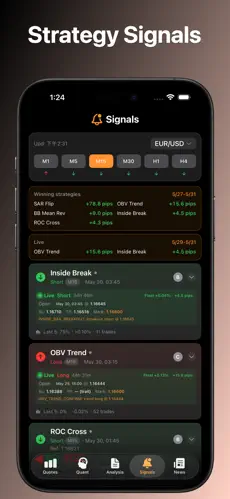
[10 strategy signals]
RSI crosses, EMA21, MACD histogram, 10-day momentum and more on M1–H4, with why it fired and a simple backtest (reference hit-rate, last 15/10/5).
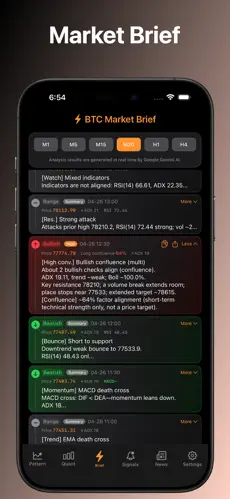
[AI briefing]
Structured 1-minute to 4-hour reads: summary, watch points, risk notes.
[Alerts · widgets · CarPlay]
Pattern and B/S alerts after sign-in. Widgets show BTC last price and a six-TF pulse. Reminders reopen the chart, not trade calls.
[Coverage]
Bitcoin (BTC) is the core, plus ETH, SOL, BNB, XRP and other major crypto for spot, order book and multi-TF charts.
[Three steps]
Pick timeframe → SYNM and TURN → compare strategy history. You still decide.
[Why BitPattern]
Most apps only show last price. BitPattern keeps patterns, backtests, TURN, SYNM, Insight, AI, calendar, widgets and alerts on one path. Every statistic names its sample and timeframe.
[Who it is for]
Newcomers learning candles; active traders who want several timeframes; anyone who wants headlines and the calendar together. Interface: Simplified Chinese, English, Japanese, Korean, French, Spanish, Portuguese, Vietnamese, Thai, German, Malay, Turkish, Hindi, Indonesian, Russian or Arabic.
[Details]
Colour sets, pinch/drag history, how-to-read cards, dark theme, system or manual language, cache.
[Data and privacy]
Charts open without an account. Sign-in only for alerts that need one. No orders, deposits, withdrawals or custody; never touches exchange accounts.
[Important]
Quotes, candles, patterns, indicators, TURN, SYNM, Analog, VCP, Elliott, AI and notifications are general study information, not investment advice. Past backtests do not predict the future. Crypto is volatile and risky.
Subscription: monthly, quarterly and annual plans with a 7-day free trial. This is an auto-renewing subscription. After the trial, payment is charged to your Apple ID. Renewal is billed within 24 hours before the current period ends. To cancel, turn off auto-renew in Settings > Apple ID > Subscriptions at least 24 hours before the period ends.
Privacy Policy: https://help.meihuagold.com/btc/en/privacy.html Terms of Use: https://help.meihuagold.com/btc/en/Premium.html
Terms of Use (EULA): https://www.apple.com/legal/internet-services/itunes/dev/stdeula/
BitPattern is a market-analysis app for Bitcoin and crypto traders: candlestick patterns, multi-timeframe indicators, rule-based backtests, AI reads, 24/7 headlines, alerts and a Home Screen widget in one place. Every conclusion shows its basis and record so you can check it yourself. Study-only — for reviewing the chart, not live orders, copy trading or investment advice.
[TURN stochastic turns]
TURN computes a smoothed stochastic %K/%D on two timeframes you pick and gives a dual-timeframe resonance verdict. Turns in overbought or oversold zones are flagged, with a dedicated chart and history. Alerts reopen the chart; they are not calls or auto-orders.
[SYNM grid]
SYNM folds MACD, MA, BOLL, Donchian, SAR, OBV, ROC, KDJ, RSI and CCI into one grid aligned with the candles: each column is one bar, each cell that indicator’s direction. A one-color column means most agree; mixed grey means they disagree.
[21 candlestick patterns]
21 classic patterns (morning/evening star, engulfing, hammer, doji and more) with counts and historical hit-rate by holding period. Study stats, not a future promise.
[Charts · six timeframes]
M1–H4. EMA, AI B/S, trend, smart, volume profile. Last price, 24-hour change, high/low. Cache for weak networks. Red-up or green-up colors.
[Insight Center]
Order-book cost, VCP breakout, momentum divergence and Elliott waves for structure checks. Analog sketches a ~2-hour path from M15 analogues and can miss in extremes. Study, not live orders.
[Nine tools]
Hourly bias, tape read, 13 MA playbooks, six-TF RSI/MACD/Bollinger stack, study-only invalidation zones, crypto/macro headlines, economic calendar.
[10 strategy signals]
RSI crosses, EMA21, MACD histogram, 10-day momentum and more on M1–H4, with why it fired and a simple backtest (reference hit-rate, last 15/10/5).
[AI briefing]
Structured 1-minute to 4-hour reads: summary, watch points, risk notes.
[Alerts · widgets · CarPlay]
Pattern and B/S alerts after sign-in. Widgets show BTC last price and a six-TF pulse. Reminders reopen the chart, not trade calls.
[Coverage]
Bitcoin (BTC) is the core, plus ETH, SOL, BNB, XRP and other major crypto for spot, order book and multi-TF charts.
[Three steps]
Pick timeframe → SYNM and TURN → compare strategy history. You still decide.
[Why BitPattern]
Most apps only show last price. BitPattern keeps patterns, backtests, TURN, SYNM, Insight, AI, calendar, widgets and alerts on one path. Every statistic names its sample and timeframe.
[Who it is for]
Newcomers learning candles; active traders who want several timeframes; anyone who wants headlines and the calendar together. Interface: Simplified Chinese, English, Japanese, Korean, French, Spanish, Portuguese, Vietnamese, Thai, German, Malay, Turkish, Hindi, Indonesian, Russian or Arabic.
[Details]
Colour sets, pinch/drag history, how-to-read cards, dark theme, system or manual language, cache.
[Data and privacy]
Charts open without an account. Sign-in only for alerts that need one. No orders, deposits, withdrawals or custody; never touches exchange accounts.
[Important]
Quotes, candles, patterns, indicators, TURN, SYNM, Analog, VCP, Elliott, AI and notifications are general study information, not investment advice. Past backtests do not predict the future. Crypto is volatile and risky.
Subscription: monthly, quarterly and annual plans with a 7-day free trial. This is an auto-renewing subscription. After the trial, payment is charged to your Apple ID. Renewal is billed within 24 hours before the current period ends. To cancel, turn off auto-renew in Settings > Apple ID > Subscriptions at least 24 hours before the period ends.
Privacy Policy: https://help.meihuagold.com/btc/en/privacy.html Terms of Use: https://help.meihuagold.com/btc/en/Premium.html
Terms of Use (EULA): https://www.apple.com/legal/internet-services/itunes/dev/stdeula/
- Smart Trend Detection Auto-detects bullish, bearish and range structures, combined with a multi-indicator composite score, so you avoid using the same wrong instinct in trending and ranging markets.
- Liquidation Risk Alert Monitors signals tied to extreme volatility and leverage risk, with deep market reads to warn you early when price action turns violent.
- Multi-Timeframe Sync Link short to daily timeframes \u2014 the big frame sets direction, the small frame finds entries \u2014 the structure at a glance.
- Pro Dark Interface A dark theme and clear information hierarchy optimized for long screen-watching, reducing eye strain with key data highlighted.
Crude Oil
Oil Pattern Pro
Professional Crude Oil Trading Tool · V2.8
Languages: English, Chinese
App Store description
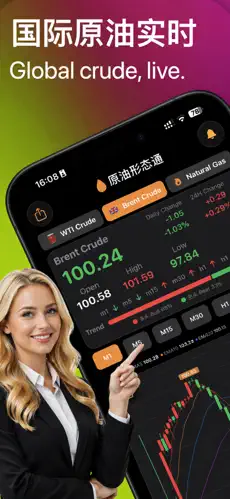
[Crude Pattern - WTI, Brent and Natural Gas on one screen]
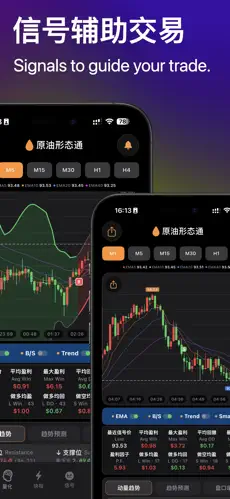
Crude Pattern is a market analysis app for energy-market learners: candlestick pattern recognition, multi-timeframe indicators, rule-based backtests, AI reads, EIA/OPEC news, condition alerts and a Home Screen widget in one place. Every conclusion shows its basis and its record, so you can check it instead of trusting a bare "buy" or "sell" tag. WTI is the core, alongside Brent and Natural Gas, plus gold and forex for cross-market context.
[New - TURN stochastic momentum turns]
TURN computes a smoothed stochastic %K/%D on two timeframes you pick, decides whether momentum has actually turned, and gives a dual-timeframe resonance verdict. Turns landing in overbought or oversold territory are flagged as the strength threshold, with a dedicated chart and history to separate a real reversal from a fake pullback. Parameters were tuned on crude and gas samples.
[New - SYNM confluence grid]
Ten indicators - MACD, MA, BOLL, Donchian, SAR, OBV, ROC, KDJ, RSI, CCI - fold into one grid aligned with the candles instead of ten separate panes. Each column is a bar, each cell that indicator's bias. One colour down a column means most indicators agree; mixed colours plus grey means they do not and the market has not picked a side.
[New - multi-timeframe confluence alerts]
Oil sessions often print a turn on M1 while H1 has not moved. Subscribe to several frames from M1 to H4; an alert fires only when those frames agree. Use it to open the chart and take notes - not as an order.
[21 candlestick patterns and six timeframes]
Morning and evening star, engulfing, hammer, shooting star, three white soldiers, three black crows, doji variants, dark cloud cover, piercing pattern, tweezers, marubozu and harami are highlighted with occurrence counts and historical win rates by holding period. Switch M1 to H4 and layer EMA ribbons, AI B/S marks, AI trend and volume profile as you like.
[Insight Center and quant tools]
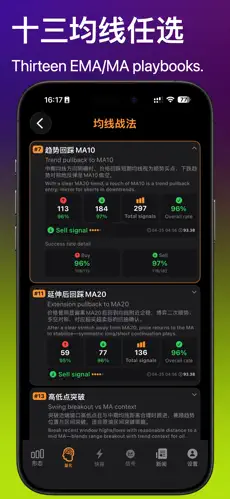
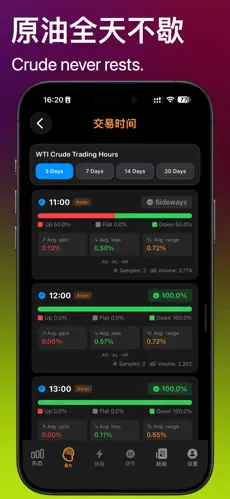
Momentum trend blends RSI strength, volatility and intraday position, spots divergences and lists support and resistance with distance. Trend forecast scores agreement across timeframes; the Analog engine matches an M15 archive for a two-hour probability path. Quant tools add session rhythm, moving-average playbooks, indicator aggregation, entry ideas with marked stops for review, a 24/7 news feed and an economic calendar covering EIA inventories, API and OPEC meetings.
[Signals, AI brief, alerts and widget]
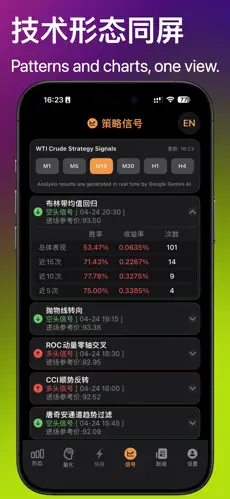
Ten rule-defined signals cover RSI crossings, price versus EMA21, MACD histogram shifts and ten-day momentum, each with its trigger reason and a simplified backtest: overall win rate, last 15, 10 and 5 results. AI briefs are generated per timeframe. Sign in for pattern, B/S and multi-TF confluence alerts, and put live crude price plus a six-timeframe pulse bar on your Lock Screen widget. CarPlay is supported.
[Important notice]
Everything here - market data, charts, pattern recognition, indicators, strategy signals, TURN, SYNM, Analog, AI analysis, multi-TF alerts and notifications - is general information and technical research material, not investment, trading or professional advice, and not live calls, copy trading or wealth management. Backtests rest on past statistics and do not indicate future results. Crude oil, natural gas and energy derivatives are highly
Premium subscription: monthly, quarterly and yearly plans with a 7-day free trial. This is an auto-renewing subscription and billing starts automatically when the trial ends. Renewal is charged to your Apple ID within 24 hours before the current period ends. To cancel, open Settings > Apple ID > Media & Purchases > View Account > Subscriptions at least 24 hours before the period ends and turn off auto-renewal. Privacy Policy: https://help.meihuagold.com/Oil/en/privacy.html Premium Terms: https://help.meihuagold.com/Oil/en/premium.html
Terms of Use (EULA): https://www.apple.com/legal/internet-services/itunes/dev/stdeula/
Crude Pattern is a market analysis app for energy-market learners: candlestick pattern recognition, multi-timeframe indicators, rule-based backtests, AI reads, EIA/OPEC news, condition alerts and a Home Screen widget in one place. Every conclusion shows its basis and its record, so you can check it instead of trusting a bare "buy" or "sell" tag. WTI is the core, alongside Brent and Natural Gas, plus gold and forex for cross-market context.
[New - TURN stochastic momentum turns]
TURN computes a smoothed stochastic %K/%D on two timeframes you pick, decides whether momentum has actually turned, and gives a dual-timeframe resonance verdict. Turns landing in overbought or oversold territory are flagged as the strength threshold, with a dedicated chart and history to separate a real reversal from a fake pullback. Parameters were tuned on crude and gas samples.
[New - SYNM confluence grid]
Ten indicators - MACD, MA, BOLL, Donchian, SAR, OBV, ROC, KDJ, RSI, CCI - fold into one grid aligned with the candles instead of ten separate panes. Each column is a bar, each cell that indicator's bias. One colour down a column means most indicators agree; mixed colours plus grey means they do not and the market has not picked a side.
[New - multi-timeframe confluence alerts]
Oil sessions often print a turn on M1 while H1 has not moved. Subscribe to several frames from M1 to H4; an alert fires only when those frames agree. Use it to open the chart and take notes - not as an order.
[21 candlestick patterns and six timeframes]
Morning and evening star, engulfing, hammer, shooting star, three white soldiers, three black crows, doji variants, dark cloud cover, piercing pattern, tweezers, marubozu and harami are highlighted with occurrence counts and historical win rates by holding period. Switch M1 to H4 and layer EMA ribbons, AI B/S marks, AI trend and volume profile as you like.
[Insight Center and quant tools]
Momentum trend blends RSI strength, volatility and intraday position, spots divergences and lists support and resistance with distance. Trend forecast scores agreement across timeframes; the Analog engine matches an M15 archive for a two-hour probability path. Quant tools add session rhythm, moving-average playbooks, indicator aggregation, entry ideas with marked stops for review, a 24/7 news feed and an economic calendar covering EIA inventories, API and OPEC meetings.
[Signals, AI brief, alerts and widget]
Ten rule-defined signals cover RSI crossings, price versus EMA21, MACD histogram shifts and ten-day momentum, each with its trigger reason and a simplified backtest: overall win rate, last 15, 10 and 5 results. AI briefs are generated per timeframe. Sign in for pattern, B/S and multi-TF confluence alerts, and put live crude price plus a six-timeframe pulse bar on your Lock Screen widget. CarPlay is supported.
[Important notice]
Everything here - market data, charts, pattern recognition, indicators, strategy signals, TURN, SYNM, Analog, AI analysis, multi-TF alerts and notifications - is general information and technical research material, not investment, trading or professional advice, and not live calls, copy trading or wealth management. Backtests rest on past statistics and do not indicate future results. Crude oil, natural gas and energy derivatives are highly
Premium subscription: monthly, quarterly and yearly plans with a 7-day free trial. This is an auto-renewing subscription and billing starts automatically when the trial ends. Renewal is charged to your Apple ID within 24 hours before the current period ends. To cancel, open Settings > Apple ID > Media & Purchases > View Account > Subscriptions at least 24 hours before the period ends and turn off auto-renewal. Privacy Policy: https://help.meihuagold.com/Oil/en/privacy.html Premium Terms: https://help.meihuagold.com/Oil/en/premium.html
Terms of Use (EULA): https://www.apple.com/legal/internet-services/itunes/dev/stdeula/
- Oil-Specialized Algorithms and UI tuned for the price drivers and volatility of crude futures; key data and signals are organized around oil trading scenarios.
- Smart Pattern Detection Auto-annotates multiple classic candlestick patterns and links them to historical win rate and recent results, so patterns are no longer just "reading pictures".
- Quant Suite Tools covering session effects, strategy backtesting and sentiment monitoring \u2014 understand oil-price behavior from several angles.
- Real-Time Refresh Market data auto-updates with synced multi-timeframe switching, reducing misjudgments and missed moves caused by lag.
Macro
Financial Calendar
Gold, Forex & Oil Economic Data Alerts · V1.1.4
Languages: English, Chinese
App Store description
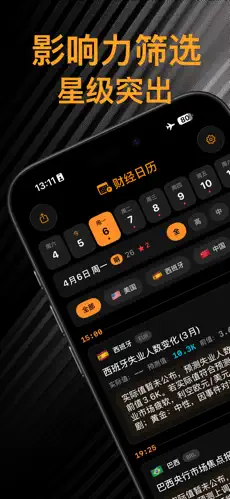
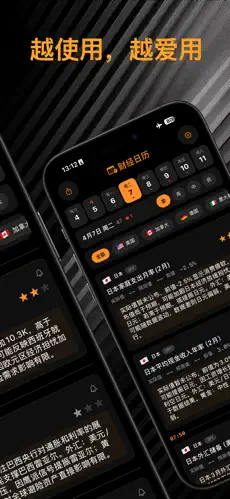
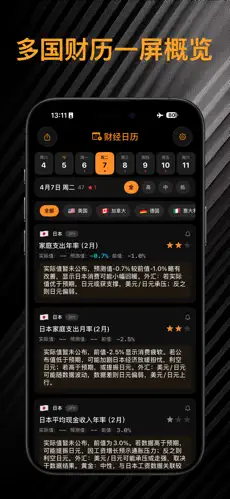
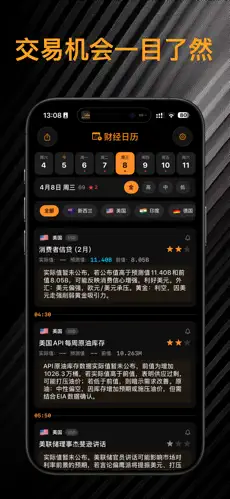
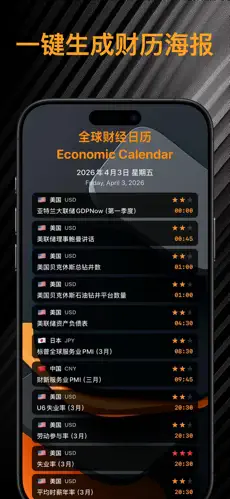
Economic Calendar (Market Day) puts four schedules in one iOS app: Calendar, IPO, Ex-rights and Holidays. The calendar lists global releases in your local timezone with country flags, currency and high/mid/low importance. Each card can show actual, forecast and previous values—NFP, CPI, GDP, FOMC and other rate decisions. Filter by country/region and importance so you only see the tape you follow. IPO covers Hong Kong, US, mainland China (Shanghai/Shenzhen/Beijing) and Korea—subscription, allotment and listing dates. Ex-rights covers HK, US, China, Japan, Korea, Singapore, Canada, Australia and Malaysia: dividends, splits and common corporate actions. Holidays list major exchange closures; browse this week, this month or all. Add an event to Apple Reminders for an alert at release time. Home Screen widgets come in small, medium and large; long-press to change importance. Share a daily poster. After Sign in with Apple, turn on analysis separately for Calendar, IPO, Ex-rights and Holidays. Content is available in Chinese and English. Calendar, IPO, ex-rights, holiday data and remarks are for learning and reference only and are not investment advice. Markets are volatile; decide for yourself.
- Global Coverage Aggregates economic data and central-bank decisions from major economies, categorized by trading-related dimensions: forex, gold and oil.
- Smart Filters Filter by country, importance and release time to quickly find today\u2019s and this week\u2019s must-watch data, avoiding information overload.
- Clear Timeline Release time, actual and forecast values shown together in a clean, distraction-free view \u2014 a glance is enough to plan the day\u2019s trading.
- Free & Ad-Free Focused on trustworthy financial-schedule info, no pop-up ads to interrupt you \u2014 ideal as a daily pre-market must-see tool.
Utility
FX Converter
Global Currency Converter Calculator · V1.1.9
Languages: English, Chinese and 16 more
App Store description
RatioGo – Currency Converter & Live Exchange Rates
Your go-to app for fast currency conversion, travel money, and everyday FX checks.
Whether you’re packing for a trip, shopping overseas online, studying abroad, or checking a quote for work, you need clear exchange rates and a reliable currency converter—not a cluttered trading terminal. RatioGo focuses on what most people actually need: instant currency conversion, easy FX rate checks, and practical tools for spending abroad.
1. Instant currency conversion
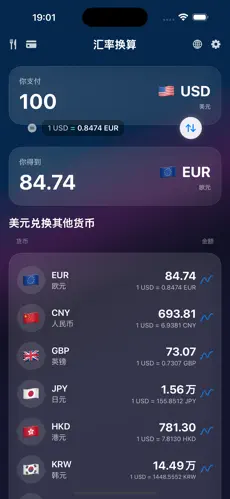
Open the app and convert in seconds with a simple “You pay / You get” flow. Enter an amount and convert between major currencies—USD, EUR, GBP, JPY, CNY, AUD, CAD, HKD, SGD, KRW, and more. Rates are based on European Central Bank (ECB) data, so you get a transparent reference for travel budgeting and everyday foreign exchange checks.
Convert both ways: local currency to foreign currency, or reverse. Price a hotel deposit, restaurant bill, or airport transfer before you go—no more guessing or jumping between websites. Quick USD to EUR, GBP to USD, EUR to GBP, and other popular pairs are always a tap away.
2. Home Screen widgets for exchange rates on the go
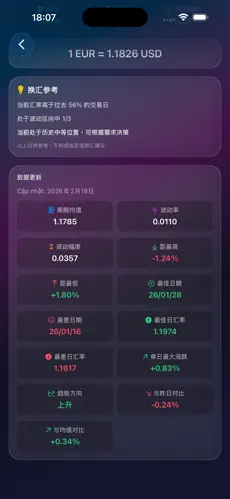
Keep rates on your Home Screen. The small widget lets you pick a custom currency pair, see the live rate, and glance at a 7-day trend. Medium and large widgets show a multi-currency rate board against your base currency—perfect before you pay abroad.
Add more than one small widget for different pairs (for example, one for USD/EUR, another for GBP/JPY). Each widget stays independent, so your travel money checklist can live right on the lock screen / Home Screen.
3. Built for travel spending
Beyond the converter, RatioGo includes tools travelers actually use:
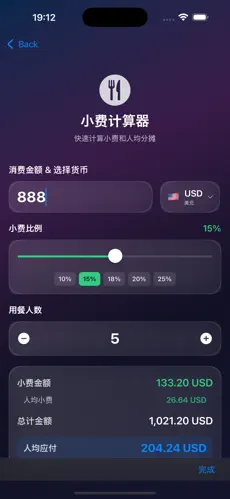
· Tip calculator – split bills and service charges with less fuss
· Travel wallet – track cash and spending alongside exchange rates
· Card / DCC-related helpers – understand dynamic currency conversion choices when paying abroad
· VAT and tax helpers – useful for shopping and reclaim scenarios
From checking today’s FX rate to spending with confidence, the flow matches real travel and cross-border shopping.
4. Rate insights, not just today’s number
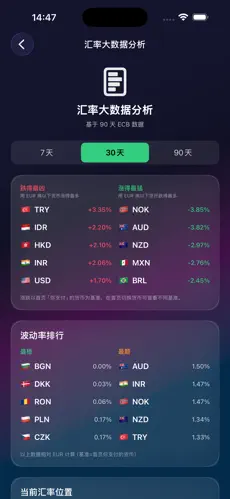
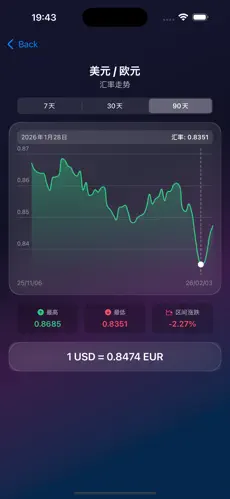
Wondering if a rate looks high or low? The analysis view helps you compare recent trends so you can decide whether to exchange now or wait. Charts make volatility easier to spot—so currency conversion isn’t just fast, it’s clearer.
5. Multilingual and easy to scan
The app supports English plus many other languages, with clear currency names and flag icons. Popular currencies are prioritized so finding USD, EUR, GBP, and other majors is quick. Clean layout, circular flags, and currency codes make the converter easy to use at a glance.
6. Why RatioGo for currency conversion?
· Built for everyday currency converter use—not day trading
· Transparent ECB-based exchange rates for travel and daily FX checks
· Home Screen widgets: custom pairs + multi-currency boards
· Travel toolkit: tips, wallet, card/DCC awareness, and tax helpers
· Multilingual UI for international users and shared devices
Who it’s for
Travelers and holidaymakers, students and expats, online shoppers buying from overseas, freelancers and small businesses dealing with foreign invoices—anyone who needs a fast currency converter and trustworthy exchange rate checks.
Remember: rates move every day—conversion should stay simple. RatioGo gives you clear currency conversion, solid FX rate references, and travel-ready tools so “What’s the rate today?” and “How much is that in my currency?” take seconds, not stress.
Download RatioGo and put live exchange rates on your Home Screen—so every cross-border payment feels under control.
Your go-to app for fast currency conversion, travel money, and everyday FX checks.
Whether you’re packing for a trip, shopping overseas online, studying abroad, or checking a quote for work, you need clear exchange rates and a reliable currency converter—not a cluttered trading terminal. RatioGo focuses on what most people actually need: instant currency conversion, easy FX rate checks, and practical tools for spending abroad.
1. Instant currency conversion
Open the app and convert in seconds with a simple “You pay / You get” flow. Enter an amount and convert between major currencies—USD, EUR, GBP, JPY, CNY, AUD, CAD, HKD, SGD, KRW, and more. Rates are based on European Central Bank (ECB) data, so you get a transparent reference for travel budgeting and everyday foreign exchange checks.
Convert both ways: local currency to foreign currency, or reverse. Price a hotel deposit, restaurant bill, or airport transfer before you go—no more guessing or jumping between websites. Quick USD to EUR, GBP to USD, EUR to GBP, and other popular pairs are always a tap away.
2. Home Screen widgets for exchange rates on the go
Keep rates on your Home Screen. The small widget lets you pick a custom currency pair, see the live rate, and glance at a 7-day trend. Medium and large widgets show a multi-currency rate board against your base currency—perfect before you pay abroad.
Add more than one small widget for different pairs (for example, one for USD/EUR, another for GBP/JPY). Each widget stays independent, so your travel money checklist can live right on the lock screen / Home Screen.
3. Built for travel spending
Beyond the converter, RatioGo includes tools travelers actually use:
· Tip calculator – split bills and service charges with less fuss
· Travel wallet – track cash and spending alongside exchange rates
· Card / DCC-related helpers – understand dynamic currency conversion choices when paying abroad
· VAT and tax helpers – useful for shopping and reclaim scenarios
From checking today’s FX rate to spending with confidence, the flow matches real travel and cross-border shopping.
4. Rate insights, not just today’s number
Wondering if a rate looks high or low? The analysis view helps you compare recent trends so you can decide whether to exchange now or wait. Charts make volatility easier to spot—so currency conversion isn’t just fast, it’s clearer.
5. Multilingual and easy to scan
The app supports English plus many other languages, with clear currency names and flag icons. Popular currencies are prioritized so finding USD, EUR, GBP, and other majors is quick. Clean layout, circular flags, and currency codes make the converter easy to use at a glance.
6. Why RatioGo for currency conversion?
· Built for everyday currency converter use—not day trading
· Transparent ECB-based exchange rates for travel and daily FX checks
· Home Screen widgets: custom pairs + multi-currency boards
· Travel toolkit: tips, wallet, card/DCC awareness, and tax helpers
· Multilingual UI for international users and shared devices
Who it’s for
Travelers and holidaymakers, students and expats, online shoppers buying from overseas, freelancers and small businesses dealing with foreign invoices—anyone who needs a fast currency converter and trustworthy exchange rate checks.
Remember: rates move every day—conversion should stay simple. RatioGo gives you clear currency conversion, solid FX rate references, and travel-ready tools so “What’s the rate today?” and “How much is that in my currency?” take seconds, not stress.
Download RatioGo and put live exchange rates on your Home Screen—so every cross-border payment feels under control.
- Authoritative Rates Connected to authoritative data feeds with continuously updated quotes; supports USD, EUR, JPY and other majors, with results precise to practical decimal places.
- Multi-Currency Wallet Save your frequently used currencies as a group and switch base/target in one tap \u2014 no re-searching currency codes while shopping abroad or buying overseas.
- Trends & Range Rate trend charts plus range highs and lows to judge whether the current rate is relatively high or low recently.
- Offline Cache When the network is poor you can still view the last-updated rates and conversion history \u2014 no need to estimate spending blind while abroad offline.
User Reviews
Rating figures are pulled from the official App Store API; the quotes below are selected excerpts on the site, not all reviews captured in real time
「What won me over is that signals show historical win rate and recent results, not empty "strong buy" talk. Hammer and engulfing patterns are clearly marked on the chart; I filter by high win rate then check MACD, and I\u2019ve dodged plenty of false breakouts.」
「The day-of-week and Asian-session stats in the quant microscope really help my day trading \u2014 I used to only know US sessions are volatile, now I can see the data on which day/hour is most active. Dark interface is easy on the eyes for long sessions.」
「From 1.0 to now, the briefing copy reads more like a human \u2014 it states key support/resistance clearly instead of piling on jargon. I use it as an assistant, an extra check before placing orders, and it doesn\u2019t conflict with my broker\u2019s app.」
「Signals are occasionally a beat late, but gold moves fast so that\u2019s understandable. Overall more reliable than peers \u2014 especially the pattern library, where you can look up each pattern\u2019s count and win rate. Great for anyone wanting to study candlesticks systematically. Recommended to my precious-metals colleague.」
「No hype: it can\u2019t decide for you, but the info density is high. 24h briefings, signals and backtest data in one app \u2014 no more tips from WeChat groups. Wish it added custom price alerts, but the current features are already worth it.」
FAQ
About the Pattern Pro series and App Store downloads
What gold, forex and oil apps does Pattern Studio offer?
The Pattern Pro series includes: Gold Pattern Pro (XAUUSD gold-futures AI analysis), FX Pattern Pro (13 major currency pairs), Oil Pattern Pro (Brent/WTI crude), Bitcoin Pattern Pro, Financial Calendar and FX Converter \u2014 all available on the App Store.
Who is Gold Pattern Pro for?
For spot-gold and gold-futures traders. It offers candlestick pattern recognition, MACD/RSI signals, historical win-rate backtesting, 24-hour AI gold briefings and a quant microscope, with English and Chinese interfaces.
What\u2019s the difference between FX Pattern Pro and Oil Pattern Pro?
FX Pattern Pro focuses on multi-timeframe patterns and signals for forex pairs like EUR/USD, GBP/USD and USD/JPY; Oil Pattern Pro is tuned for crude futures, offering oil-specific market scanning, session effects and AI analysis. Both show verifiable App Store ratings.
Does the data come from the official App Store?
Each app\u2019s rating and rating count on the App Store is pulled automatically via Apple\u2019s official iTunes API; the user quotes on the page are selected excerpts. Quote and signal features are subject to the app\u2019s actual capabilities.
Do you provide investment advice?
All quantitative analysis and AI reads are for study and technical research only and do not constitute investment advice. Forex, gold and oil trading carry high risk \u2014 decide independently and manage your risk.
About Pattern Studio
Pattern Studio (MeihuaGold) focuses on fintech mobile tools, providing professional iOS apps for gold (XAUUSD), forex, crude oil, bitcoin and more. The Pattern Pro series covers candlestick pattern recognition, MACD and multi-indicator signals, AI briefings, quant backtesting and a financial calendar \u2014 all on the App Store, with Chinese and English interfaces.